
Opened the office back up today, having mixed feelings about it. Not worried about the virus, just really liked working in my back yard...
- Details
We just updated SYIXmail.
The entire upgrade was To make it easier to work with Tablets and cell phones, but still just as easy on the computer. To see the new easier to use version, open SYIXmail , then find the "Settings" then "User Interface" Scroll down and find "Elastic" select it and save. You will find cellphones MUCH easier to use.
- Details
OKAY, THE COVID 19 VIRUS WINS. I'll stay home...
Effective Tuesday, April 7, the office will remain locked up most of the day, I'll work from home and keep things going from there.
Calls will be answered like normal, but in person visits will only be available with an appointment.
So, Need answers? Call me! 530-755-1751
Need a human? Call me! 530-755-1751 and lets setup a time to meet at the office
Regular Mail and whatnot will be handled as normal, I'll make at least one visit here a day to handle that.
If you need to drop off a check, please use the slot on the right side of the door, if you need/want to pay with cash, call me and we'll work something out.
Please stay healthy, we can't bear to loose a single one of our friends.
BONUS: Here are a few links to help you track the progress of this virus:
- Details
- Details
Checking Email settings on an Android Phone.
I am using my phone, its an Google Pixel XL, with Android Version 10 on it. If yours isn't like this, complain to your vendor that they need to upgrade you. Otherwise, yours at least should be similar.
The very first screen is the "Settings". To find it, find the App called Settings, or drag the top of the screen down and find the small gear that gets you here. Open Accounts (mid way down the screen probably)
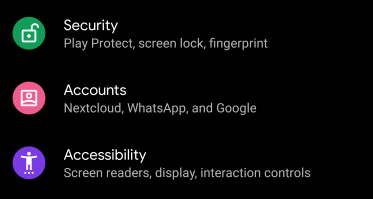
Now you get this next screen:
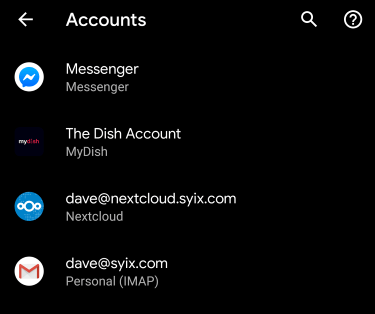
Find the one that looks like mine, but of course your name in the email field. Open it.
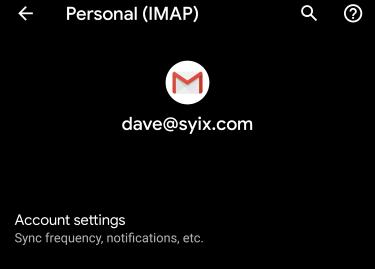
Now open the "Account Settings" and see this:
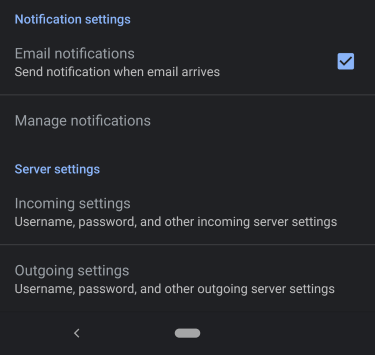
Down there on the bottom are the mail server settings. Open the one you need help on, they are both shown next:
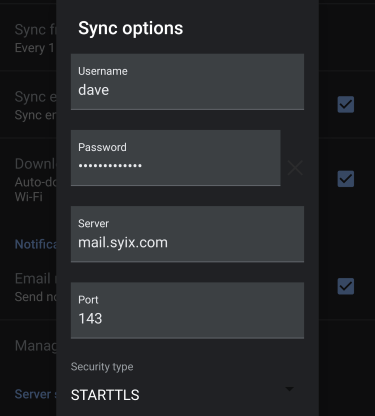
First the incoming settings. Your Account settings are on a seperate email, but should look like these mostly.
For the outgoing email, again, your settings are on a seperate email, but mine look like this
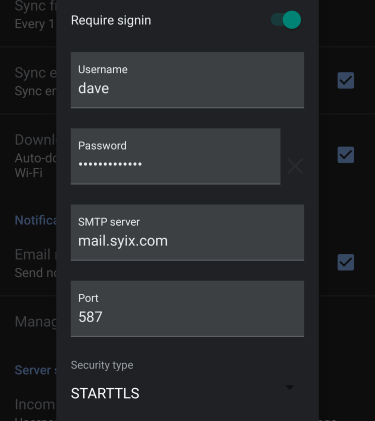
After clicking DONE you should get no errors, and the mail should flow again.
Enjoy!
- Details
Tech Support Scams are getting a lot of news lately, and we have fielded quite a few calls from people with "this is windows, your computer is infected" type calls, or big scarey flashing lights and sirens telling them to "stop and call us!"
Don't call them, if they call hang up. Thats the entire rule you need to remember.
You aren't infected, but you let them in, you will be. Here is a few sites with accurate information if you need more.
Just remember, nobody can tell what is going on with your computer except you.
SYIX
- Details
Today there was a lot of scarey stuff released about WiFi! KRACK is a new and fun way to replace the Wifi key your computer or phone has setup with the router, which allows someone to force your devices to act unsafe. Lets relax a bit, but be aware.
The immediate danger is that someone is tracking your login with a redirect to a non-ssl site. So, make SURE that if you are entering a password, the page you enter it on has a little lock up there. A nice pretty green lock and says all is still locked up and using secure protocols. More patching will follow over the next few weeks, Microsoft and Apple both say patches are forthcoming, Android phones since version 6. will be updated soon. Just be safe!
If you have questions, we really don't have any other answers yet. Patches are forthcoming from all the vendors (it appears) so in a few weeks this will be old news again.
Remember, it requires someone else be on YOUR network to see the packets. So if you are at home, you are probably fairly safe, but in a public hotspot you are very much NOT safe.
In depth details: https://www.krackattacks.com/